You Can Make a Video with Claude Now. Here's How to Post It
Claude Code can write and render a finished video. It can't post one to Instagram, Facebook, LinkedIn or X on its own. The three ways to get it posted, and how to go from render to scheduled post with Claude still in the loop.
Yes, you can make a video with Claude. Claude Code writes the video as code and renders it to an MP4 file on your computer. What Claude can't do by itself is post that video to Instagram, Facebook, LinkedIn or X. For that it needs a publishing tool connected to your accounts, and the easiest way to give it one is an MCP server.
Making the video used to be the slow part. For a lot of short social video it isn't any more. The slow part is now everything after the render.
The whole idea in 27 seconds. Claude makes the video in the chat, then Rheos schedules it to four channels.
How Claude makes a video
Claude doesn't film anything, and it doesn't generate footage the way Veo, Sora or Higgsfield do. It writes code that draws each frame, and a renderer turns those frames into a video.
The two tools you'll see most are Remotion, which builds videos in React, and HyperFrames, which builds them from HTML and CSS animation. You describe the video in plain English. Claude Code writes the scenes, installs what it needs, renders the file and shows you the result. You ask for changes the same way.
This suits a particular kind of video:
- text on screen, captions and titles that move
- explainers, how-tos and product walkthroughs
- charts, numbers and before-and-after comparisons
- your logo, colours and fonts, applied the same way every time
It doesn't suit anything that needs real people or real places. For those you still want your phone, or an AI footage tool, and Claude Code can cut that footage into the same template.
We make our own launch videos this way, in Claude Code. The render takes minutes. Getting each one ready for four platforms is the part that takes the time.
Why posting is the hard part
A finished MP4 on your computer isn't a post. To get it live, something has to:
- Hold a signed-in connection to each account, and keep it working as the logins expire.
- Upload the video the way each platform wants it. Instagram fetches it from a public link, then processes it before it can go live. LinkedIn and X take it in chunks.
- Write a caption that fits each platform, because a LinkedIn caption and an Instagram caption shouldn't read the same.
- Put it out at a sensible time, and keep doing that every week.
Claude can reason about all of this. It can't do any of it without access to your accounts. Instagram's publishing API also only works for professional (business or creator) accounts, so a personal profile is out whichever route you pick.
Three ways to get the video posted
1. Upload it yourself
Download the MP4, open each app, upload, paste a caption, post. For one video a week on one platform, this is fine and it's free. It stops being fine at four platforms, or at a video a day.
2. Use a scheduler
Meta Business Suite is free and schedules Reels to Instagram and Facebook together. Buffer, Later and the rest add more platforms. You still upload the file and write every caption by hand, and the tool that made the video never finds out where it went. If that's all you need, a scheduler is the cheaper answer. Our Buffer or Later comparison covers the difference.
3. Connect a posting tool to Claude
This is where MCP comes in. MCP lets Claude call tools in other software. Connect one that can publish, and the same Claude that made the video can write the captions and schedule it.
You can build this yourself on the Instagram Graph API, LinkedIn's API and X's API, with your own app review, tokens and upload code. It's a good weekend project and a lot of upkeep. Or you can connect a service that already has the platform connections.
From render to scheduled post with Rheos
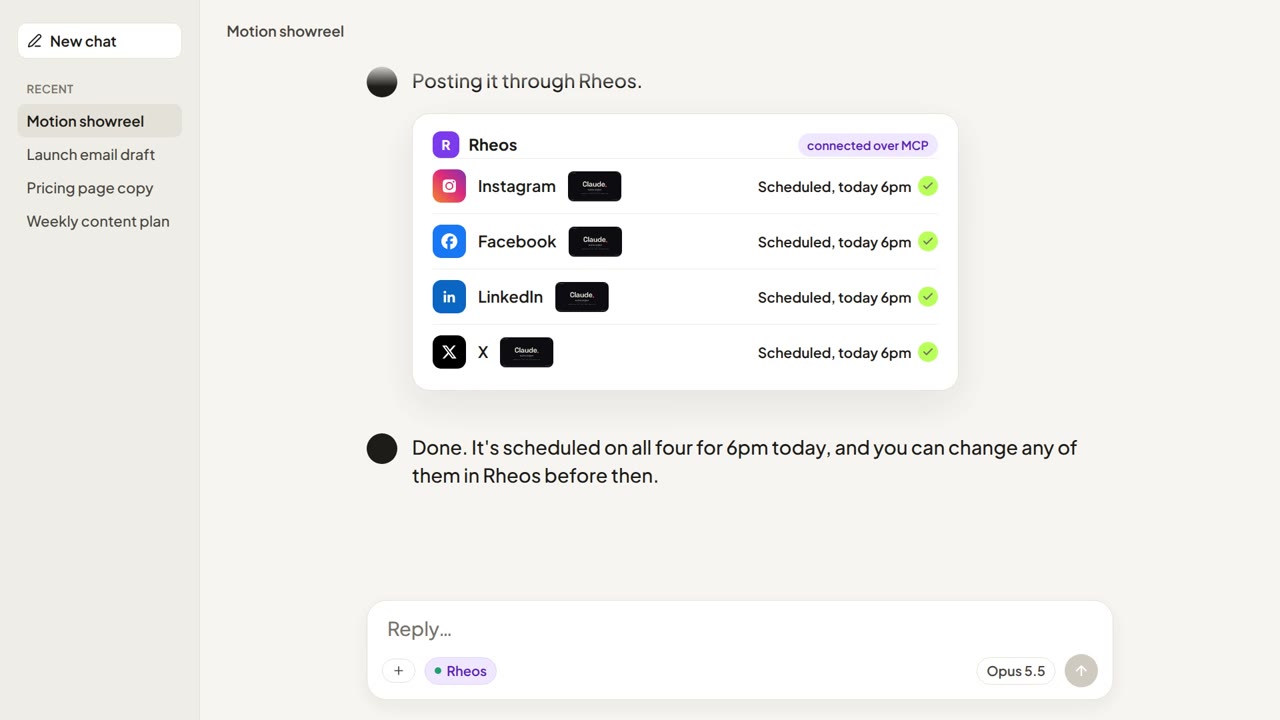
Rheos is a social media tool with its own MCP server. It posts to Instagram, Facebook, LinkedIn and X. Here's the whole run:
- Connect Rheos once. Run
claude mcp add --transport http rheos https://mcp.rheos.appand sign in with your Rheos account. The connect page has the steps for Claude Desktop, claude.ai and ChatGPT. - Make the video. Ask Claude Code for the video you want and let it render.
- Put it in Rheos. Drop the MP4 into your brand's library in Rheos. If the video is already online, in a shared drive or a cloud render, Claude can pass Rheos the link instead. Rheos takes MP4, MOV or WebM up to 25 MB. A short clip at normal quality fits. A long one needs compressing first.
- Write the captions. Rheos already has your brand, your voice and your past posts, so Claude writes a caption for each platform in your voice, not a generic one.
- Schedule it. Pick the time, or post now. Rheos puts it out on each platform you chose.
- See how it did. Rheos shows how each post did on each platform.
Rheos doesn't post to TikTok or YouTube. If those are your main channels, a scheduler that covers them is the better tool today.
Rheos costs £55 a month including VAT. You can try it free for 10 days, no card needed. See pricing.
One video is easy. Every week is the work
The cost of making a video has dropped close to nothing for this kind of content. That changes what matters. A business that posts one good video in October and nothing in November is less visible than one that posts a plain one every week.
It also matters beyond the feed. People now ask ChatGPT and Google's AI answers before they get in touch with a business, and those answers draw on what's out there, social posts included. Posting regularly is part of being found. We cover that in what GEO is.
Anyone can make the video now. Rheos gets it posted.
Frequently asked questions
Can Claude make videos?
Yes, with Claude Code. It writes the video as code, using a tool like Remotion or HyperFrames, and renders an MP4 file. It's best at text, motion graphics, explainers and product walkthroughs. It doesn't generate realistic footage of people or places.
Can Claude post to Instagram?
Not on its own. Claude needs a publishing tool connected through MCP, with access to an Instagram professional account. Rheos is one: add it to Claude, and Claude can upload a video, write the caption and schedule the post.
Can Claude schedule Instagram posts?
Yes, once it's connected to a tool that schedules. With Rheos connected, Claude can schedule a post or Reel to Instagram, Facebook, LinkedIn and X for a set time.
Can I post AI-generated videos on Instagram?
Yes. Meta asks you to label video or audio that's realistic and made or altered with AI, and it may add an "AI info" label itself. Motion graphics and animated text made in code usually aren't what that rule is aimed at, but check Meta's current guidance if your video shows realistic people or events.
Does Rheos make the video?
No. You make it, in Claude Code or anywhere else, and Rheos posts it. Rheos writes captions and can make images, but for video it's the scheduling and posting side.
Does Rheos post to TikTok or YouTube?
No. Rheos posts to Instagram, Facebook, LinkedIn and X.
Related Articles
Can Claude Schedule Instagram Posts? Yes, Once It's Connected
Claude can't post to Instagram on its own. Connect a publishing tool through MCP and it can schedule posts, carousels and Reels. The three ways to connect it, and what each one asks of you.

ChatGPT Can Make Your Social Media Images Now. Here's What to Do Next.
ChatGPT's new image model makes social media-ready graphics from a sentence. The tricky part is getting them onto Instagram, LinkedIn, TikTok and the rest — here's a simple workflow.

How to Publish Social Media Posts from Inside ChatGPT and Claude
MCP turns ChatGPT and Claude into publishing tools. Here is what that actually means for small business owners — and what is still rough about it.