Can Claude Schedule Instagram Posts? Yes, Once It's Connected
Claude can't post to Instagram on its own. Connect a publishing tool through MCP and it can schedule posts, carousels and Reels. The three ways to connect it, and what each one asks of you.
Claude can schedule Instagram posts, but only once you connect it to a tool that can publish. On its own, Claude has no access to your Instagram account. Add a publishing tool through MCP, sign in, and Claude can write the caption, attach the photo or video, and schedule it for a set time.
The same goes for Claude Code and for ChatGPT. The model is the easy part. The connection to your account is the part you have to add.
What Claude needs before it can post
Two things, whichever route you take.
An Instagram professional account. Instagram's publishing API works for business and creator accounts only. If yours is a personal profile, switch it in the Instagram app under Settings, then Account type and tools. It's free and takes a minute.
A publishing tool connected to Claude. Claude talks to other software through MCP, the Model Context Protocol. An MCP server gives Claude a set of tools it can call, such as "upload this video" or "schedule this post". You add the server to Claude once, sign in, and the tools are there in every chat.
Three ways to connect Claude to Instagram
1. An open-source Instagram MCP server
There are Instagram MCP servers on GitHub you can run yourself. You create a Meta developer app, generate an access token, and point the server at your account.
This works if you're a developer and you only need Instagram. You look after the tokens when they expire, and a Reel has to be hosted at a public link before Instagram will fetch it. Check whether the one you pick can schedule, or only post straight away.
2. An automation platform
Zapier, Composio and n8n all connect to Instagram and can be reached from Claude. You sign in once and they handle the tokens.
They're built to connect everything to everything, so they know nothing about your brand. Claude still writes every caption from scratch, and each platform is a separate set of steps.
3. A social media tool with its own MCP server
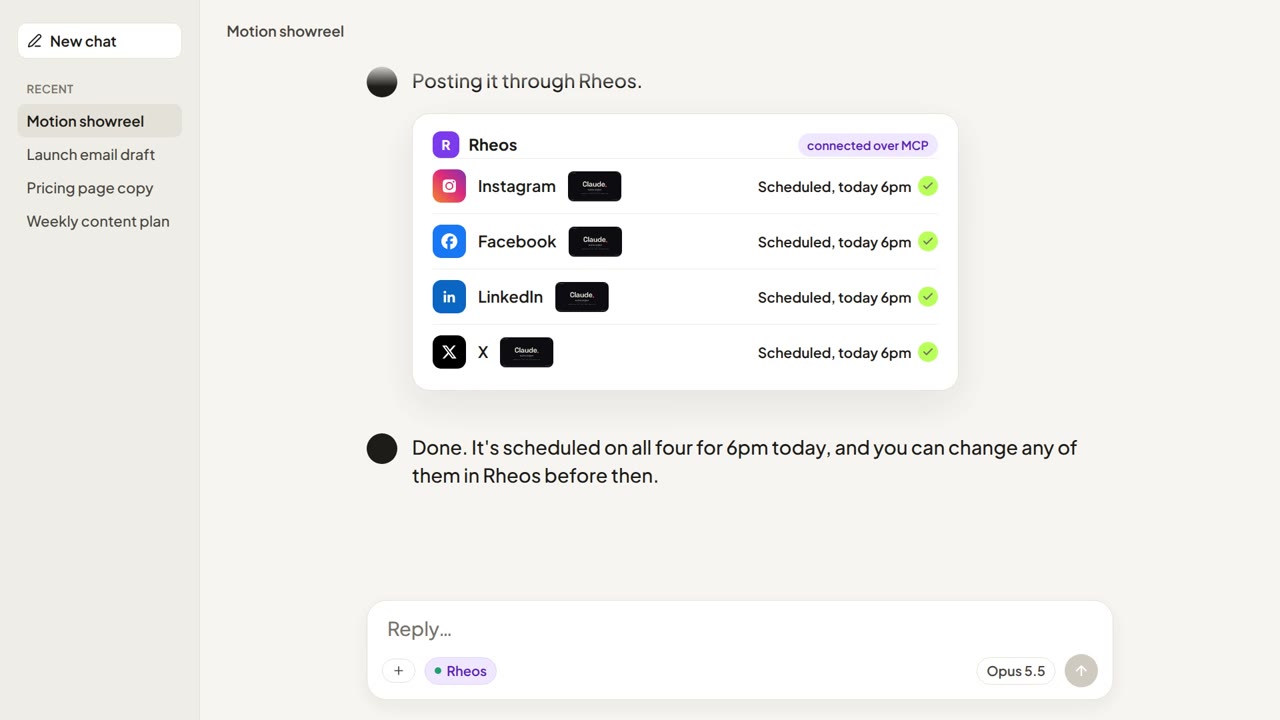
Rheos has one. It posts to Instagram, Facebook, LinkedIn and X, and it already knows your brand, your voice and what you've posted before. Add it to Claude, sign in with your Rheos account, and Claude can schedule to any of the four from the same chat.
Scheduling an Instagram post from Claude with Rheos
- Add Rheos to Claude. In Claude Code run
claude mcp add --transport http rheos https://mcp.rheos.app. In Claude Desktop or claude.ai, addhttps://mcp.rheos.appas a custom connector. The connect page has the steps for each app, including ChatGPT. - Connect Instagram in Rheos. Link your Instagram professional account once in the Rheos dashboard.
- Ask for the post. For example: "Write an Instagram post about our new autumn menu using the photo in my library, and schedule it for Thursday at 6pm."
- Check it and schedule it. Claude drafts the caption in your brand's voice. Change anything you want, then tell it to schedule, or post now.
It works the same for a carousel or a Reel. For video, drop the file into your Rheos library first, or give Claude a link to it. Rheos takes MP4, MOV or WebM up to 25 MB. We cover the whole run from a video Claude made to a scheduled Reel in how to post a video you made with Claude.
Rheos costs £55 a month including VAT. You can try it free for 10 days, no card needed. See pricing.
When you don't need Claude for this
If you already have the post finished and only want it to go out on Thursday, the Instagram app can schedule it for free. Professional accounts can schedule posts and Reels in the app. Meta Business Suite does the same on desktop, and posts to your Facebook Page at the same time.
Connecting Claude pays off when the writing is the slow part, or when you post to more than Instagram.
Frequently asked questions
Can Claude post directly to Instagram?
Not by itself. Claude needs a publishing tool connected through MCP and an Instagram professional account. With one connected, Claude can post now or schedule for later.
Can Claude Code post to Instagram?
Yes, in the same way. Add an MCP server that can publish, such as Rheos with claude mcp add --transport http rheos https://mcp.rheos.app, and Claude Code can schedule the post from the terminal.
Can ChatGPT post to Instagram?
Yes, if you add a publishing tool as a connector. ChatGPT supports remote MCP servers, and Rheos works there with the same address.
Can Claude schedule Instagram Reels?
Yes. Put the video in your Rheos library or give Claude a link to it, and Claude can schedule it as a Reel. The file needs to be MP4, MOV or WebM and under 25 MB.
Does it work with a personal Instagram account?
No. Instagram only allows publishing tools on business and creator accounts. Switching is free in the Instagram app.
Related Articles
You Can Make a Video with Claude Now. Here's How to Post It
Claude Code can write and render a finished video. It can't post one to Instagram, Facebook, LinkedIn or X on its own. The three ways to get it posted, and how to go from render to scheduled post with Claude still in the loop.

ChatGPT Can Make Your Social Media Images Now. Here's What to Do Next.
ChatGPT's new image model makes social media-ready graphics from a sentence. The tricky part is getting them onto Instagram, LinkedIn, TikTok and the rest — here's a simple workflow.
How to Publish Social Media Posts from Inside ChatGPT and Claude
MCP turns ChatGPT and Claude into publishing tools. Here is what that actually means for small business owners — and what is still rough about it.