Updates
Changelog
Latest updates and improvements to Rheos.
Rheos V2
Rheos V2 is live. We rebuilt most of it around what you told us: a plan for every week, ideas before anything gets written, images made from your own photos, and edits that only change what you ask for.
The big changes come first, then everything else, including what we've shipped since our last update in May.
Strategy: a plan for every week
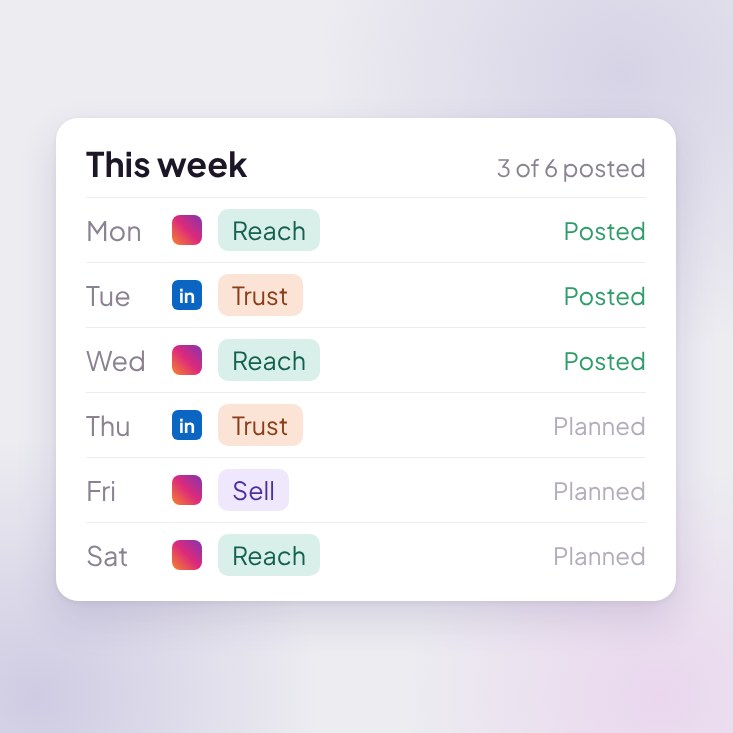
- One page for your plan. Strategy shows your goal, your platforms, how often you post, and your mix of Reach, Trust and Sell posts.
- You stay in charge. Change the platforms and how many posts a week, and edit the plan in place, with Undo in your brand's History.
- Week and Month views. See your plan as a board, by platform or by content type, and add an idea to any day.
- Choose how days are decided. Let Rheos pick the days, or use a queue with no set days. You still schedule each post yourself.
- Take a week off and add a note that shows on Home.
- Open slots start posts on Home too, where you see this week's plan.
- A Flexible plan switch counts every post on a plan account towards the week.
Create images from your Library
You asked for this more than anything else. Open Image from your Library and Rheos suggests photos to use. Pick the ones you want, keep any of them on every image for the session, then describe what you want. Rheos makes new images from your own photos.
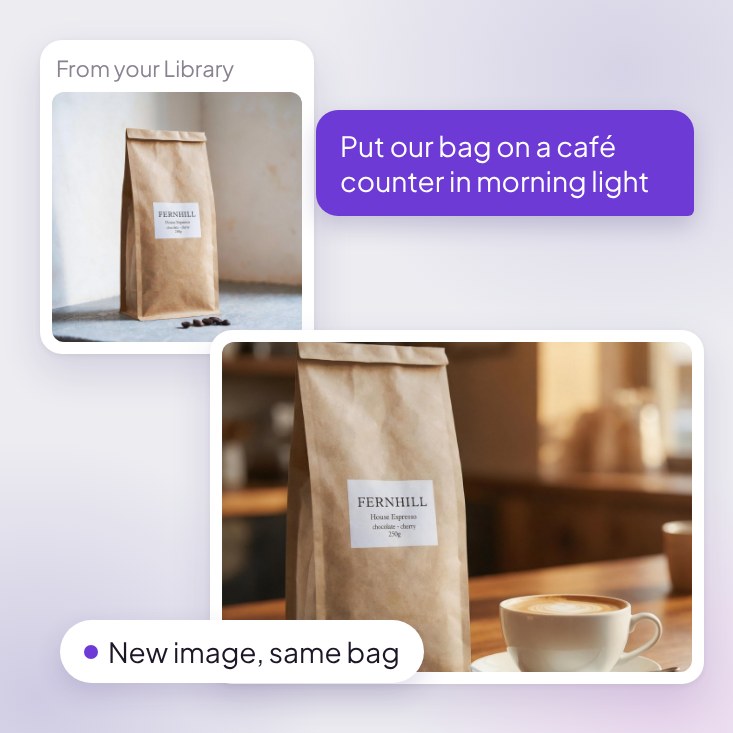
- Start from the Library. Select Image, "Generate & edit visuals", in the Create band at the top of the Library.
- Add a note to each photo saying how to use it, and Rheos works from them.
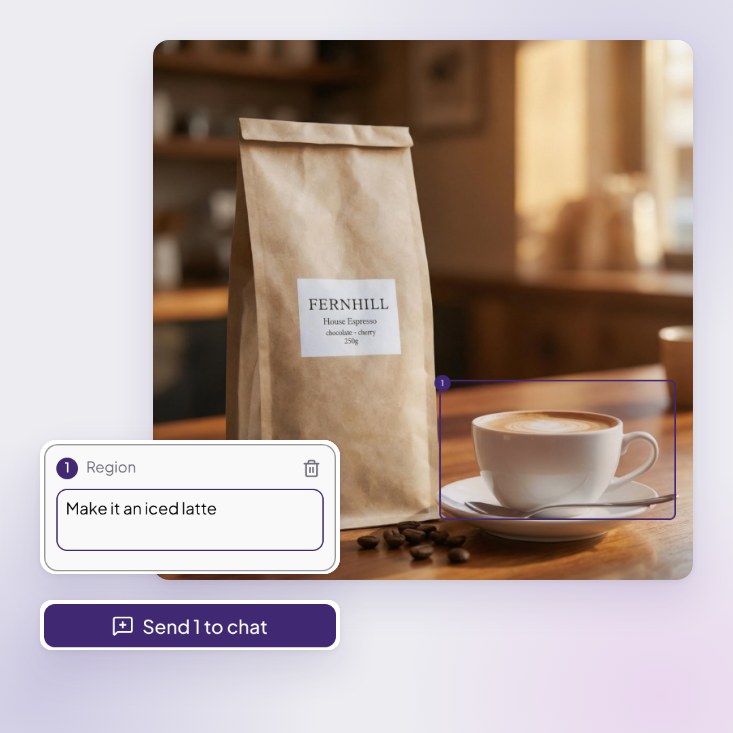
- Magic Edit and Layers. Change one part of an image with Magic Edit. Layers splits an image into parts you can edit and recombine.
- Reference styles: save the looks you like on your brand and reuse them in any image session. Your brand style applies every time.
- Chat to make and change images from the post editor too, and Use in this post to attach the result.
- Redo exactly what an image was made with, keep every version, and Create post straight from an image.
- Images made by AI are labelled, so you can say so in the caption.
Ideas first, then the post
No more prompt, wall of text, rewrite. Tell Rheos what the post is about, answer a quick question, and pick from a few ideas. Only then does it write, in the voice of the account the post goes out on.
- Start from a short interview. Tell Rheos what the post is about and it asks what's missing before it writes anything, then offers a few ideas.
- Pick an idea first, or ask for more, before the draft is written. Each idea can start with the words or with an image.
- Nothing in mind? Choose Suggest something and Rheos looks through your Library, your recent posts and your brand, then offers a few ideas and says where each one came from. Open slots in your plan get their own ideas too. Choose Draft it now to skip the questions.
Chat with every post
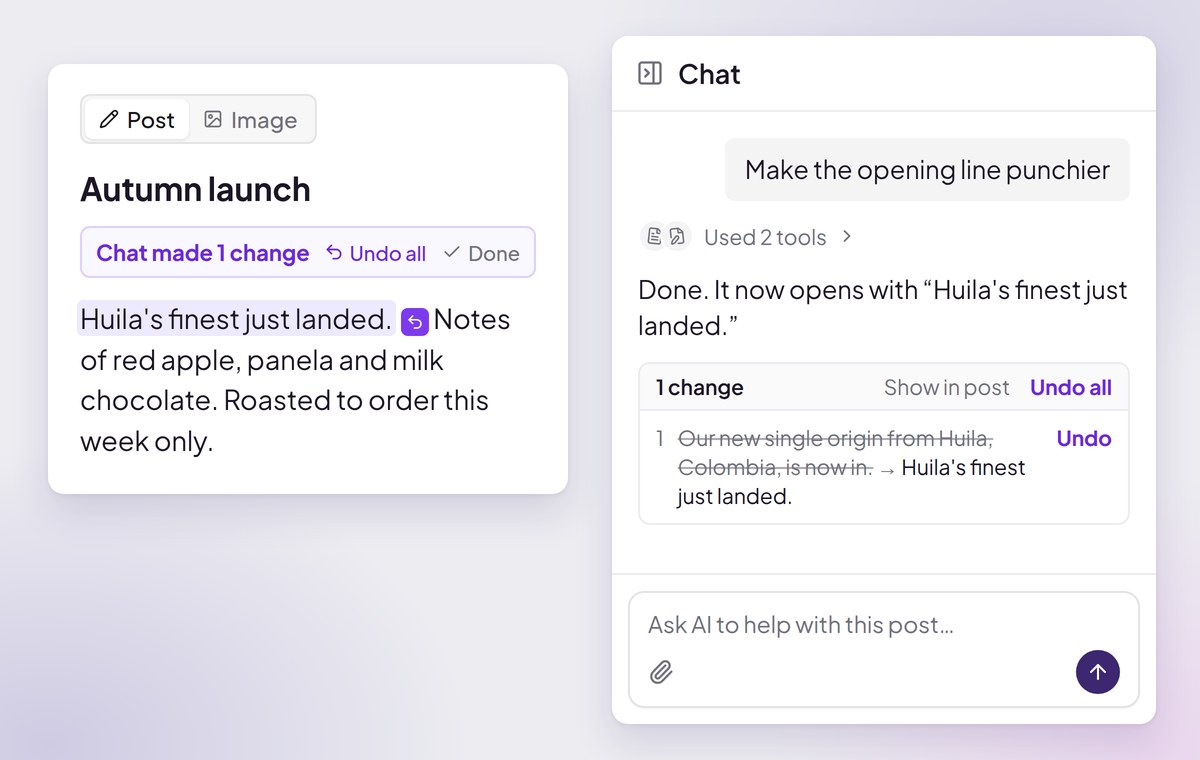
Every post now has its own chat beside it. Ask Rheos to make the opening punchier, shorten it or change the tone, and it edits the post for you, with every change easy to undo. Switch to Image to work on the picture the same way.
- Undo one change or all of them. Rheos lists what it changed under its reply, with an Undo on each one, or Undo all.
- Research from the chat. Ask it to look something up and it searches the web or reads a page you link, then tells you which site each fact came from. It can look through your Library for a photo too.
Analytics on one page
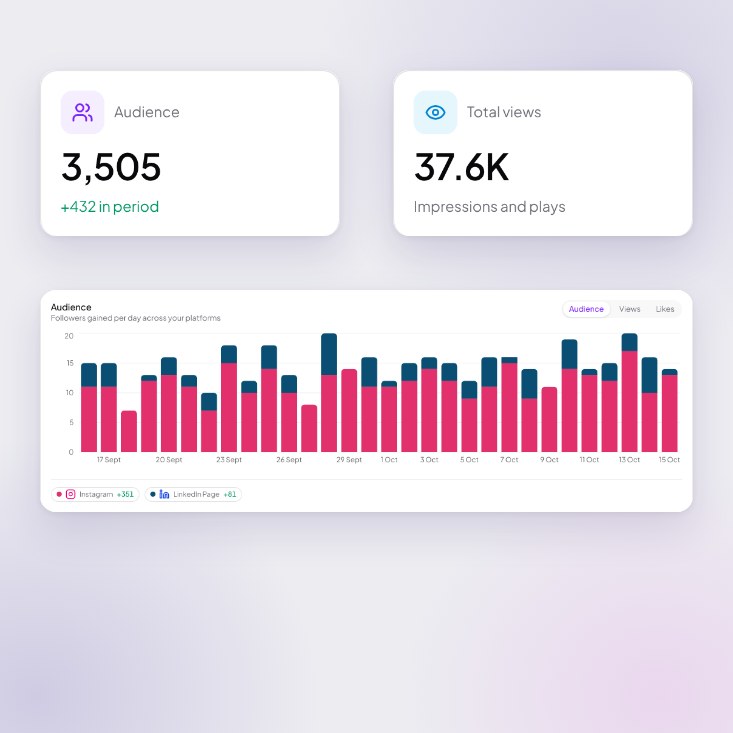
- One simple page. Choose 7, 30 or 90 days and see your audience, total views and most-liked posts across every platform, with a chart stacked by platform.
- Post review lists your posts with their likes, and flags the ones that beat your usual.
- More accurate LinkedIn numbers for whole company Pages, and X follower counts.
- Imported posts are dated by when they were published, not when they were imported.
What's coming next
- Canva: your Rheos images and Canva designs, working together.
- Carousels: build multi-slide posts in your brand, right in the editor.
- Video: turn your ideas into short videos for each platform.
- Season plans: a content strategy that runs for a season, built from what you've already made.
- AI search (beta): see how your business shows up when people ask ChatGPT and other AI tools, and what to do about it.
Everything else in V2, area by area.
More in the post editor
- Write it myself if you'd rather skip the AI. The editor, previews and scheduling all still work.
- Pick the platform per post: Instagram, Facebook, LinkedIn or X, one at a time.
- Attach context to any post: files, links and notes, with a note on each one. Attach a picture and Rheos writes the caption around it. Rheos reads PDFs and text files you attach.
- Your voice, on the right account. A post is written in the voice of the account it goes out on, personal or business.
- Check it before it posts. Post now shows a summary of where the post is going before anything is sent.
- Recent steps holds words a reload would have lost, so one Undo brings them back.
- Hashtag manager for saving and reusing hashtag groups.
- Writing is more natural, uses British English, and no longer invents details or links.
Your brand, rebuilt around your voice
- One brand page with a brand document you can edit and comment on, a Voice tab and a new ICP tab (your ideal customers) that shows where each audience makes decisions on each platform.
- Your voice shapes the first draft. Rheos seeds it from the social handles you give at signup.
- Brand edits apply all-or-nothing, so a failed edit never leaves your brand half-changed.
- The separate Sources page has moved into the brand page.
Getting started
- A shorter start. Sign up, answer a short form, then one conversation builds your brand for you.
- Rheos looks your company up on Companies House and reads your website and socials, so there's less to type.
- The conversation asks which platforms your business posts on, then sets up your weekly posting plan. Rheos decides how many posts a week to start you on, so there's nothing to guess. Your plan sits on the Strategy page, and any open slot starts a post.
- A free reference style. If you have a website, Rheos turns it and your logo into your first image style while you onboard, with one free Refresh.
- Signed up with email? Verify your address to start making images. The last onboarding step reminds you and can resend the email.
- A checklist in the sidebar walks you to your first connected account and your first post.
Simpler plans
- One plan: Social Media Manager, £55 a month inc. VAT, for one business.
- Try it free for 10 days, no card needed. If you don't add a card by the end of the trial, your account moves to the Free plan.
- Unlimited posts and images on Social Media Manager. On Free you get 3 posts a week and about 80 images a month.
- No watermark on your images.
- Plans now sit on the Billing page, and only owners can change billing.
Publishing you can trust
- One post, one platform. Each post now targets a single platform. Instagram and Facebook are separate choices.
- Clear connection status for every account, and the reconnect warning clears as soon as a connection works again.
- Character limits follow your account. X Premium accounts get the full 25,000 characters.
- Choose which Facebook Page or LinkedIn company page to publish to.
- No more silent failures, double posts or dropped media, and you can't schedule to an account that isn't connected.
- Media is checked before it goes. Rheos checks images against each platform's rules before you schedule or post, stops what can't be sent and warns you about what won't be.
- Delete a published post. Delete from all removes it from the platform and from Rheos. If a platform won't let Rheos delete it, Rheos says it is still live there. To reuse a live post, duplicate it. Archiving a scheduled post cancels its schedule first.
- Scheduled posts count towards your weekly plan. Dropping a post on the calendar fills an open slot when it fits, and moving it to another week reopens its old slot.
- Bluesky and Mastodon can no longer be connected. You can connect Instagram, Facebook, LinkedIn (personal and company) and X.
Library
- Search and filters by source, date and shape, and see where each image came from. Search also finds words inside your PDFs.
- Open any file to edit it or use it in a post, with one preview window and right-click actions.
- Add the pictures from a PDF to your Library.
- Pick files from Google Drive. Rheos only sees the files you choose.
- Uploads up to 2GB, including iPhone HEIC photos.
- Your personal brand's uploads now show in the Library.
And more
- All your posts now live on Home. The old Posts list is gone.
- Live chat help from the ? button in the sidebar.
- Belong to more than one organisation and switch between them.
- A bottom navigation bar on phones.
- Tighter security across team accounts: who can see, change and delete what is now enforced on our servers.
- Faster first load, with loading screens that match what is coming and no flash of onboarding or empty pages.
As always, tell us what you think from the ? button in the app.
Rheos just got an overhaul
We've just released a new update that makes things a whole lot easier.
New dashboard
Cleaner home, faster brand switching from the sidebar.
Updated post creation
The flow is a lot clearer, and the new comment-to-edit system on posts is really intuitive — highlight a sentence and tell the AI what to change.
General interface updates
Tidier brand screens, smoother navigation, less hopping between pages.
New dashboard, smarter image models, and a brand hub that talks back
Biggest update since launch. Three new surfaces, one rewired core.
A dashboard that actually shows you what's happening
The old dashboard was a list. The new one is a timeline.
- Vertical content timeline — every post, every brand, in one scroll. Granola-inspired.
- Content Plan — the whole month at a glance. Expand to multi-week view, collapse back to one viewport.
- Brand pips — every row tagged with the brand it belongs to.
Auto image model selection
Three image models live in Rheos now. Pick whichever you want, or let Rheos pick.
- Nano Banana 2 — fast, cheap, good for everyday graphics.
- Nano Banana Pro — higher quality, with thinking levels you can crank up for harder briefs.
- GPT Image 2 — slowest but smartest. Longer thinking, best brand fidelity, photorealistic results.
The model selector is inline on every generation. Each model has its own credit cost and ETA bucket so you know what you're trading off before you click.
Brand management hub
Identity documents are no longer static. They're a workspace.
- Tile-based layout — basic info up top, sources and socials side-by-side below, brand kit alongside.
- Click-to-document — every tile expands into the full document for that part of your brand.
- Scoped chat editor — a chat panel attached to your identity document. Edit your brand voice, sources, or audience by talking to it. Every change goes through an approval flow before it commits.
- URL-driven — Vercel-style brand-mode navigation. Switch brands without losing context.
Unified Post Editor — preview everywhere
- Per-platform publish previews — see exactly how your post will look on every channel before you ship.
- UPE modes — different layouts for different post types (idea, draft, scheduled, published).
- Slot-gen action — generate the next post in a series with one click.
- Best-times shared lib — schedule recommendations now use the same engine across the app.
Behind the scenes
- Per-model credit costs so pricing is transparent.
- Streaming progress on every image generation with per-model ETA buckets.
- Web search grounding on Gemini for fresher, more accurate copy.
This is the foundation we'll be building on for the rest of the year.
GPT Image 2 + image edit mode
Two things shipped together: the latest image model and a smarter way to iterate.
GPT Image 2 — added the day it dropped
OpenAI released GPT Image 2 and we had it live in Rheos on day one.
- Photorealistic output — finally good enough for product shots and lifestyle imagery.
- Better prompt adherence — does what you ask for instead of approximating.
- Brand-true scenes — feed it your logo and it composes around it instead of erasing it.
- Pick it from the model selector on any image generation. Falls back gracefully if the API has a wobble.
Edit mode — iterate without losing the thread
Generated an image you almost like? Now you can edit it instead of starting from scratch.
- Lineage tracking — every edit is linked to its parent so you can compare versions.
- Reference-aware — keeps the parts you liked, changes the parts you didn't.
- Same model, same credits — just hit "edit" on any generation.
These two together mean you actually finish an image inside Rheos, instead of bouncing out to a designer to fix it.
Rheos is live
After four months of building, Rheos is live and open to everyone.
What you get on day one
- AI content creation — text posts, images, and carousels, generated on-brand from your website.
- Scheduling across every major platform — LinkedIn, Instagram, Facebook, X, and Threads from one calendar.
- Brand learning — paste your URL, Rheos reads your site and learns your voice, audience, and visual style.
This is v1 — the foundation. Everything from here is making it sharper, faster, and more useful.