How to Post to LinkedIn and Instagram from Claude
A practical guide to publishing social media posts directly from Claude Desktop using MCP — and why the brand voice layer is the part that actually matters.
If you use Claude every day to draft posts, there is a strange friction in what happens next. You write a good LinkedIn post in the conversation, copy it, open another tab, paste it, check the preview, maybe tweak the spacing, and finally hit publish. Claude never sees what went out, never knows what performed, and cannot follow up.
Model Context Protocol (MCP)
•An open protocol from Anthropic that lets AI assistants like Claude connect to external tools and data sources. An MCP server exposes a set of tools — functions the AI can call — so Claude can read, write, and act in systems outside the chat.MCP closes that loop. It lets Claude actually do the work, not just write the words. This piece walks through the three real options for posting to LinkedIn and Instagram from Claude, and where each one fits.
Option 1: A raw platform MCP server
The open-source world already has LinkedIn and Instagram MCP servers. You can install jlbadano/ig-mcp or stickerdaniel/linkedin-mcp-server into Claude Desktop, generate API tokens yourself, and get a working publish_post tool.
This route is fine if you are a developer, you only care about one platform, and you are happy managing OAuth tokens and refresh flows on your own machine. It breaks down fast once you want anything else — brand consistency, scheduling, images, analytics. Those servers do one thing: they post.
Option 2: An aggregator like Zapier MCP or Composio
Aggregators solve the platform sprawl problem. Zapier MCP, Composio, and Pipedream MCP each expose hundreds of services — including LinkedIn and Instagram — behind a single hosted endpoint. You paste one URL into Claude Desktop, OAuth through a browser popup, and Claude gains access to a library of post tools.
This is a good choice for developers building agent workflows across many apps. It is a poor choice for anyone who wants a brand to come out the other side. The tools are generic. Claude sees a function called linkedin_create_post(text, image_url) and nothing about who you are. Every conversation starts at zero.
Option 3: A brand-aware publishing MCP
The third option — and the one we built Rheos for — is a publishing MCP that ships your brand context alongside the tools.
Why brand context matters more than the publish tool
The publish call is the easy part. Every MCP server can post to LinkedIn. What changes the output is what Claude knows before it drafts: your tone, your pillars, your audience, what worked last month, what you never say. That context is what turns a generic LLM post into something your customers recognise as yours.
The Rheos MCP gives Claude tools for the whole job. The main ones:
rheos_get_context— returns your brand voice, content pillars, and audience.rheos_create— drafts an on-brand post for a given platform and intent.rheos_image_generate— makes a brand-consistent image using your visual identity.rheos_upload_video— adds a video you already have (MP4, MOV or WebM, up to 25 MB).rheos_schedule_post— queues a post for a set time on Instagram, Facebook, LinkedIn or X.rheos_publish_post— publishes straight away.
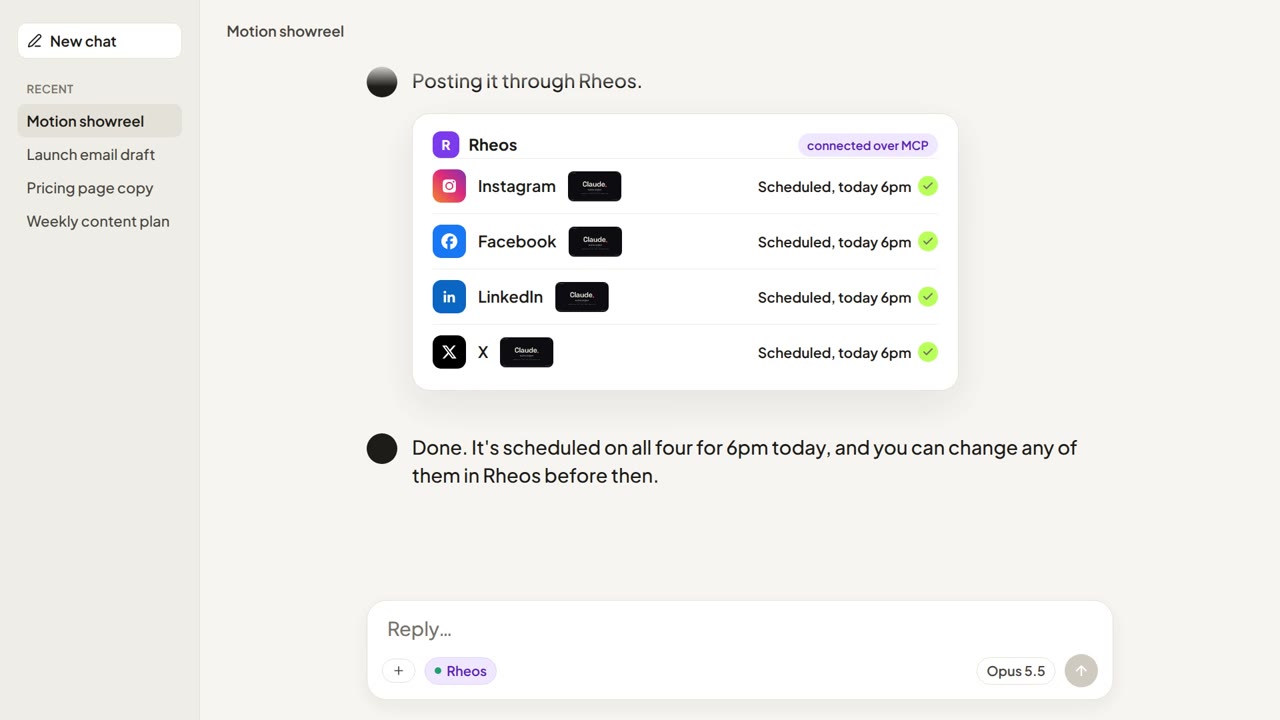
The practical effect: you say "draft me three LinkedIn posts for this week on the sustainability pillar, then schedule them" and Claude does it in your voice, queues them, and reports the publish times back in the chat. No copy-paste, no second tab.
How to set it up
Three steps, once:
- In Claude, go to Settings → Connectors → Add custom connector, and paste
https://mcp.rheos.app. In Claude Code, runclaude mcp add --transport http rheos https://mcp.rheos.app. - Sign in to Rheos when Claude asks.
- Connect your social accounts in the Rheos dashboard.
The connect page has the steps for each app.
From that point on, every Claude conversation has access to your brand and your publishing pipe. You can treat Claude as a marketing collaborator who remembers — because the memory lives in Rheos, not in the chat window.
Which option should you pick?
If you are a developer building something custom, the raw servers or aggregators are the right shape — they are plumbing, and plumbing is what you want. If you run a business and you want Claude to help you actually post, not just draft, you want a layer that knows your brand. That is the category Rheos is in, and it is still largely empty. For more on why brand-coherent social content matters now, see our research on social media as a primary citation source in AI search.
FAQ
Summary
Three paths exist for publishing social media from Claude: raw open-source MCP servers for developers, aggregators like Zapier and Composio for generic automation, and brand-aware platforms like Rheos for businesses that want the output to sound like them. The difference is not the publish call — every option can post. The difference is whether Claude knows who is posting.
Related reading
Built for your kind of business
Rheos plans your social media and drafts the first version of every post. You edit and approve, and it goes out on time.
It learns your brand, voice and style.
From your website and your posts, it picks up how you sound and what you stand for.
Rheos
Social media marketing for small businesses, without the admin.
- Small business owners
- Founders doing their own marketing
- Marketers in small teams
Direct and plain. Talks to owners as peers, in British English.
Plus Jakarta Sans
Read from rheos.app and @rheosapp
A plan to reach small business owners.
It works out where small business owners, founders doing their own marketing and marketers in small teams look, and plans the week around them.
Ideas from what is going on at your business.
This week: five-minute routine, customer story, tip of the week. It turns each into a post idea you can edit, with images from your library.
Out on LinkedIn and the rest.
“Five minutes a day is enough” and the rest of the week, scheduled across Instagram, Facebook, LinkedIn and X from one calendar.
See what worked for your business.
Which posts got seen, grew the following and turned into customers. That feeds straight back into next week's plan.
You can try it free for 10 days, no card needed. Then £55/month including VAT.
Archie Roberts
Archie Roberts is the founder of Rheos, which plans social media for UK small businesses and drafts the first version of every post for the owner to edit and approve. He writes about how small business owners can show up where their customers look.
Related Articles
Can Claude Schedule Instagram Posts? Yes, Once It's Connected
Claude can't post to Instagram on its own. Connect a publishing tool through MCP and it can schedule posts, carousels and Reels. The three ways to connect it, and what each one asks of you.
You Can Make a Video with Claude Now. Here's How to Post It
Claude Code can write and render a finished video. It can't post one to Instagram, Facebook, LinkedIn or X on its own. The three ways to get it posted, and how to go from render to scheduled post with Claude still in the loop.

ChatGPT Can Make Your Social Media Images Now. Here's What to Do Next.
ChatGPT's new image model makes social media-ready graphics from a sentence. The tricky part is getting them onto Instagram, LinkedIn, TikTok and the rest — here's a simple workflow.